














Depends on the yo-yo…
I’m looking at a Nyquist as my next board, I just haven’t committed to buying it yet.
3 Likes
That’s two of the best things about my current favorite keyboard, I’ll be the devils advocate here. Do it. Ortholinear, mechanical AND split??? AND HOT SWAP?!? My advantage 360 doesn’t even have hot swap!
2 Likes
Oh keyboards are much worse. Especially once you start modding them to your taste.
2 Likes
Just recently picked up a Royal Kludge R87 “pro”. I just loved the aesthetics the grey look w/ the side lighting really fits in with my new system build that I am working on. So far the board has been decent but I do have a few annoyances with it.
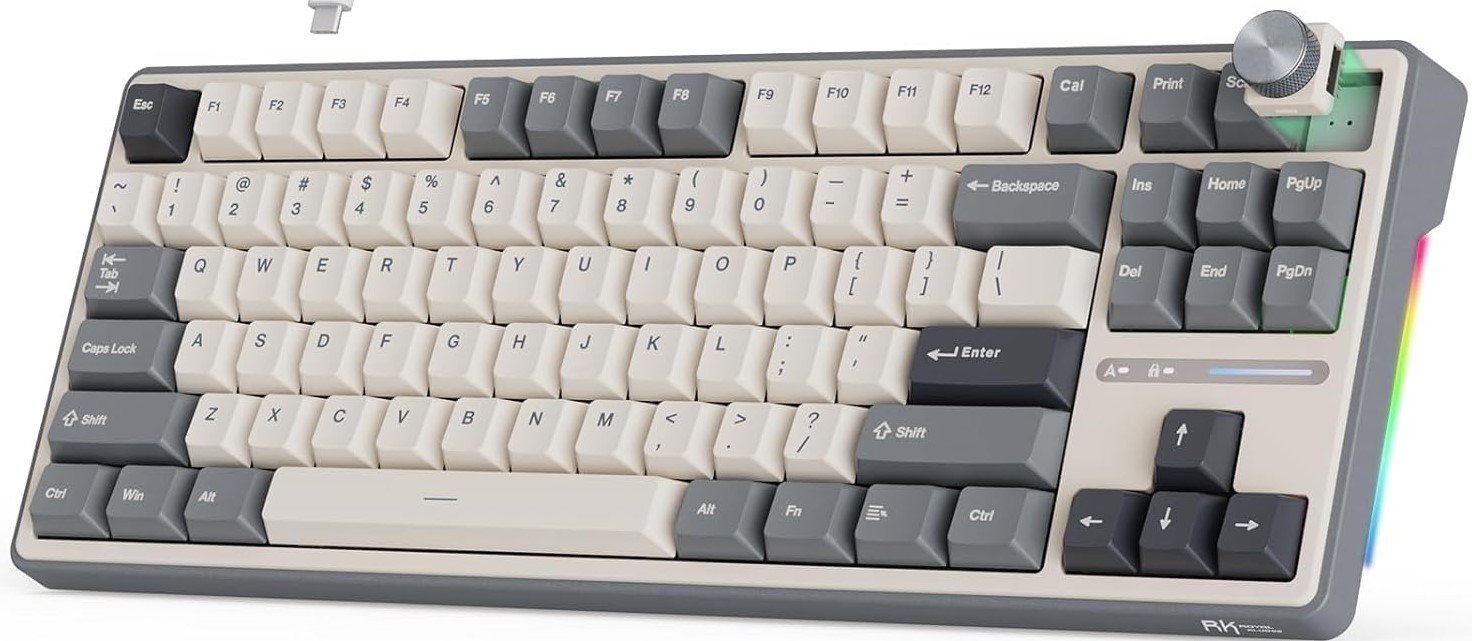
I don’t like these “creamy” switches at all. ( if you’d like them let me know ) They are far-to-soft for my liking. I prefer a little tactility on the press. I had some cherry switches leftover from a custom macro key I made for my girlfriend a while ago so I switched out the alpha keys, space bar, shift, ctrl, and enter keys.
Sadly this kind of cut down on the backlight though since these cherry switches don’t have the cutout in them for the backlight. I like the feel of them more than the creamy RK switches but I’m also not a fan of the way they sound on this chassis. I think I am going to go with some penguin V3 switches to quiet it down some more. They are rated at the around the same travel range as the cherry but they are a bit more silent. If that doesn’t get it to the sound that I prefer then I may dive in and insulate it a little more.
The other thing I wish this board had was a little bit of a protrusion on the bottom edge to support / rest the thumb on while typing. The edge is just too thin to get a good purchase on so it feels like I have to kind of float on the space bar to rest my hands / thumbs. I don’t know if that makes any sense.
Then encoder wheel is also a little too short, or the spacing it off because the stupid “scroll” button is in the way when trying to turn the dial wheel. I think I’m just going to remove the scroll button and cap it off with a flat cap so I can get a better grip on the wheel. I may even print a TPU ring to go around the dial to give it more grip. If that doesn’t work then maybe I’ll print a taller knob for it or something.
That is one thing that bugs me about a lot of the tkl boards out there. There’s some unnecessary keys that nobody uses or they are spaced in a weird configuration. Like, what’s with the vertical row of keys on some boards? I hate those! I have never used the scroll key, home, pgup/pgdn. I’d assume just just remove them from most setups. The location of those keys on this board are pretty good though aside from the scroll key being too close to the encoder dial.
One other tiny little thing that is a bit annoying is while playing games, hitting the “C” button with the thumb can sometimes result in a false hit of the space bar. I think this is a huge issue while gaming. I’m going to try to build up some more muscle memory with it and hopefully that will become less of an issue as I get more comfortable with it’s layout. OR! Maybe I’ll shave down the posts on the space bar key cap to knock it down a little 

Aside from those few gripes, it’s a pretty cool keyboard. I’d say it’s worth the purchase thus far. The space bar is super solid, it’s supported really well, there’s no rocking at all! It has a nice eva gasket all around and it’s quite hefty for being a wired only board. The weight keeps it planted in place very nicely. Everything is hot-swappable it’s supported by via and the backlight is configurable. I do wish there was a deeper level of LED programming through VIA but I think that’s more of a via limitation than a keyboard limitation. Perhaps I’ll write a custom light config from scratch later.
As I said before, it’s a pretty nice keyboard. I know I have some complaints but most of those things are just me being a bit nit-picky. I think for the price it’s a super solid keyboard with lot’s of room to grow with and mod on.
2 Likes
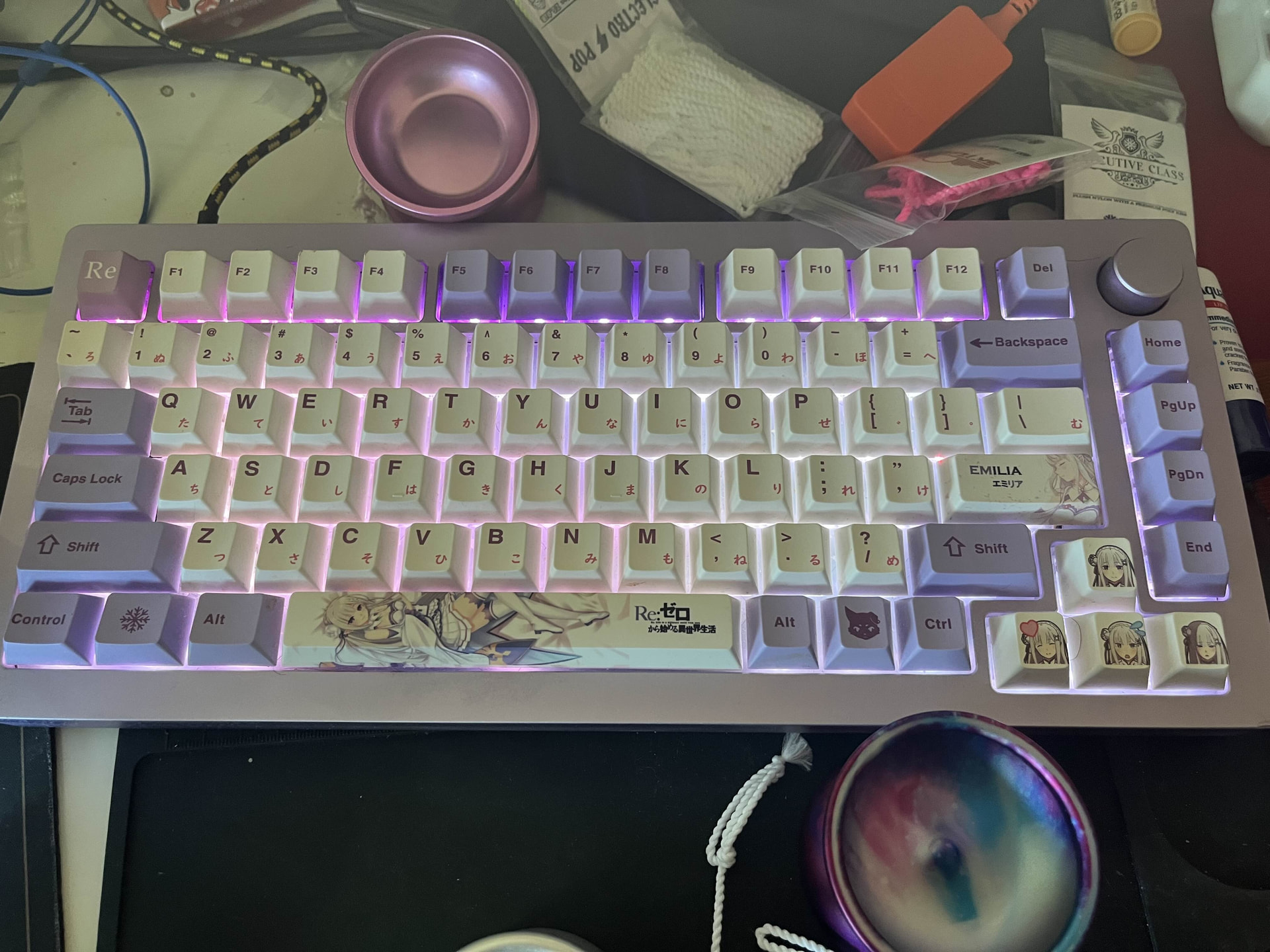
i have an absurd amount of keyboards, but I love my Monsgeek M1 
Kangaroo switches (i think), they sound & feel awesome (kinda like an in-between of MX brown & blue) the M1’s foam setup makes it sound even better
3 Likes
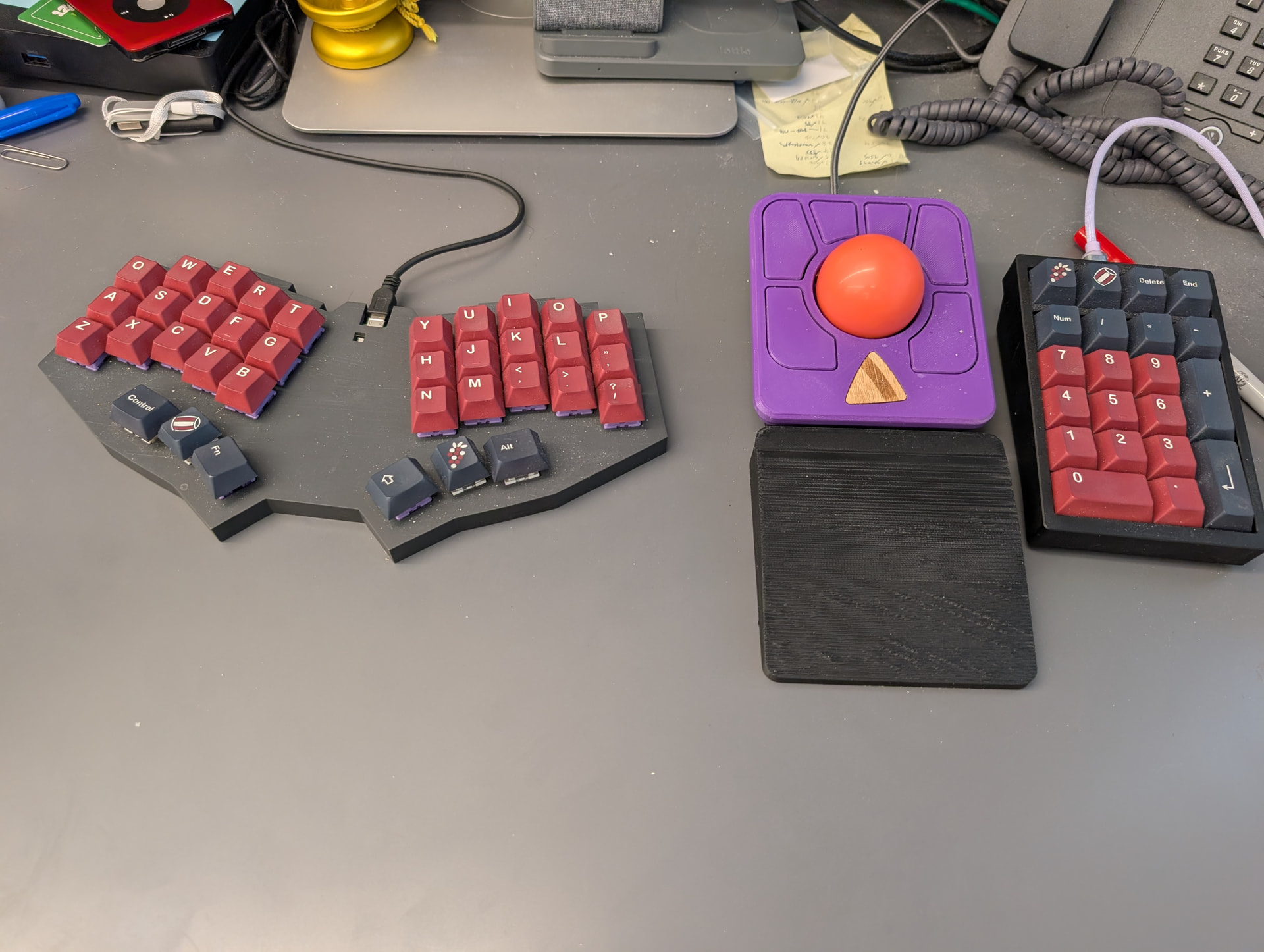
Work setup
Kbdpad mkII numpad
Ploopy adept trackball
Crowboard with 3d printed case, tecsee purple pandas, and ~1.5mm neoprene foam under the pcb
5 Likes
I’m looking for a new mechanical keyboard but trying not to get sucked into the black void of choice paralysis.
I’ve used a Logitech MX Mechanical Mini for years and have been overall happy with it, just looking for a change and something more satisfying to type on. I spend most of my days coding, emailing, or sending Slack messages. I’d prefer it not be too loud, since I do a fair amount of typing in meetings and on calls. I prefer a smaller keyboard 65% range because I like dedicated arrow keys, but don’t want or need a numpad. I’m not ready to go split or ego because I do a fair bit of work on the road, and across different laptops, and personally find layout switching mildly annoying when I’m trying to stay productive.
Would like to keep it under $500, but closer to the $200 mark is preferable; not a big deal if the extra cash makes my working life less annoying. 
Any recommendations?
1 Like
I use a split ortholinear in my home office and also frequently work upstairs on my MacBook and you get used to layout shifting imo.
My main is a Dygma Defy. I ordered it with silent pink switches but swapped them out for silent tactiles that give you that pop feel without noise.

I also have a small Ducky 60% for my second work computer (I have a second machine that runs a special operating system required to access certain systems) I like the Ducky a lot and I think they do make versions with arrow keys.

If you get one and find it’s too loud for the office just swap the switches out for something quieter.
1 Like

I’ve got a Freestyle Edge from Kinesis with the lift kit and Gateron Brown Pro v1 Switches.
Been using a Freestyle in one form or another for over 10 years.
3 Likes
My last two non-ergo, non-ortho boards were a Pok3r and a Ducky MIYA Pro. I loved both. I bought two Pok3rs.
1 Like
You’re spoiled for choice at 65%. So it helps to narrow it down. You’d probably want QMK/VIA for firmware support and modification. And hot-swap so you can try stuff out easily (also to clean individual keys and switches).
If you’re picky about type feel then you want to choose your own switches. That’s what I did, bare Keychron Q6 Max with Gazzew Boba U4T. I was using Cherry Brown for the tactile bump on a Ducky and the new one is an upgrade in every way. Gazzew has a fantastic feel and pleasant deep thock sound. U4Tx is their quietest. Sound tests here: https://www.youtube.com/watch?v=ho3yOAmeHPA
As for keyboard body. If you want quiet you definitely want acoustic foam in the build. I got the Q6 since it also has gaskets, Q2 is their 65% one. If you get Keychron don’t get it from their store. Mechanicalkeyboards.com or the rain forest site. You want to be able to return it easily just in case. Do not get their switches!
Nuphy Halo65 V2, Nuphy Air75 (if you’re okay with the size) are good too. If you have large hands you probably want a 75.
If you want a low profile the switches are different. Look at the Iqunix MQ80 and Kailh Deep Sea Mini Silent Whale switches (get it from aliexpress). The only low profile tactile quiet switches available. Iqunix Magi65 if you want a lower price point. But you’d probably dislike the lack of travel coming from the Logitech MX.
Then you’ve got keycaps. Personally I like the softer feel of silicone, and the LEDs shine through them. And since the legends are underneath, it’ll take a very long time to wear them off. If you want shine through look up PBT or get a less expensive set. If you don’t care about LED then your life is easier. There are different keycap shapes as well. But most common is Cherry profile. I personally like it.
2 Likes
I almost forgot about my favorite compact keyboard. My upstairs keyboard, I use it for steam games from the couch. Varmilo Minilo 75%. Kailh Prestige Silent switches and Frida Kahlo keycap set.
Some stuff like Bluetooth is a little counterintuitive, I have to google it every time I want to pair it but otherwise love it.

3 Likes
We have some smart people here. I purchased two of these keyboards a black and a white and they came with literally zero instructions and there are no instructions online. I’m gonna email the shop in case they can help but I thought maybe someone here would know the order of operations here!
This is the white kit.
None of the pieces are threaded except for these little brass standoffs. The standoffs don’t fit inside the little holes in any of the holes in any pieces except the pcb itself.
Here’s all the parts.

And the individual parts that make up the left half.


Anyone have clues what order this pile of stuff would be stacked and assembled in?  I’ve been staring at it for an hour. Probably doesn’t help that I’ve never assembled a keyboard myself.
2 Likes
I reccomend the taekeyboard or hipyo tech YT channel to watch some KBs get assembled
2 Likes
That helped a lot thanks. I actually remembered once I started watching I have done this before too lol just forgot. These are my first Choc switch keyboards though. Once I figured out where to stick the brass standoffs the rest is falling into place. Gonna have to finish them tomorrow though but the mystery is solved.
1 Like
I’m surprised I didn’t find this thread sooner! I’ll play… Here are some shots of a few of my boards.
Top: Neo Ergo with hand lubed Baby Kangaroo switches on a carbon fiber plate (no foam), keycaps are MTNU 800
Middle: Wireless Lily58 from Typeractive, Baby Kangaroo switches with MT3 White in Black keycaps
Bottom: Corne v3 “Ice" wireless variant with Baby Kangaroos and MT3 White on Black. For this one I ordered the PCBs from JLC PCB and all the components from other vendors. Did the soldering in a little reflow toaster I use for such things.


4 Likes
I have a MicroMoog, Realistic MG-1, Roland JX-3p and a Yamaha CS-01. Do they count as mechanical keyboards?
1 Like
Oh, never mind, those are analog… I guess the only mechanical keyboard I have would be my pump organ.

